Showing posts with label Product Review. Show all posts

Friday, December 2, 2011

Find My iPod/iPhone

BACKGROUND
     Everyone has experienced it, sometime in your life you misplace your things. Sometimes it also happens that people get extra "curious" with your stuff and get hold of them. In these days of iPod and iPhone popularity most people would not like it if their gadget goes MIA. Gladly Apple has a nifty solution for this. They have a built in app inside these gadgets that will enable you to track them somehow and also remotely  perform some actions on them.

REQUIREMENTS
• iPod/iPhone runs iOS 5.0 or higher
      If not you can update your device first. Just connect your device to your Mac or PC and follow the onscreen instructions in iTunes. This update also requires that your iTunes is version 10.5 or higher. So if it's not, you need to update your iTunes first.
• iCloud turned on and properly set up
     On your iOS device, go to settings then choose iCloud. Create and set up your iCloud account. Make sure that Find My iPod/iPhone is set to on.

FEATURES
• Locate your device on a map

• Display a message on the screen
• Play a sound for two minutes at full volume (even if your device is set to silent)
• Remotely lock your device

• Remotely wipe your device to erase your personal data

• New features for iCloud users:
     Ability to find a Mac
     Option to request an email when an offline device comes online and is located
 
USER REVIEW
     I tried to locate my device by using my PC. I point my browser to iCloud.com then logged in with my iTunes account. After authentication, I clicked on the Find My iPhone icon. And there, my device appeared on a map powered by Google.
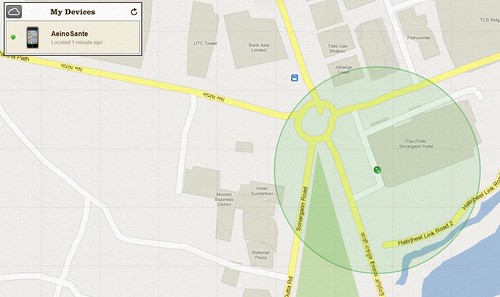
Geographic location of the device
     I would say that this location report is quite accurate to about 15 meter radius as I have tried the location tracking for many times. But this of course will depend on your location. As I am in the city with many cellsites near my location so the accuracy of the triangulation calculation is high.
     Clicking the icon on the map will show a pop up options to perform remote actions on your device. You have the choice to send a message and optionally play a sound in full volume, remotely lock the device or conduct a remote wipe. Choosing to lock will just lock your device using your current lock key. Remote wipe will restore the device to factory settings and delete all your confidential data in the process.This is useful if you have sensitive information on your device that should not fall into the hands of unauthorized person or competitor.

Actions that can be performed remotely
     I choose the option to send a message and play sound on my device. The response was immediate. The message appear on my device with the label "Important Message" and my device plays a tone that sounds like a locator beacon for two minutes. If you just choose to play a sound without a message an alert will appear on the device with the label "Find My iPod touch Alert". This play sound option will be very useful if you just misplace your device and its in silent mode so the old technique of calling it from another phone will not work. One downside is that if your device is already on the hands of someone else its very easy to stop the sound. Momentarily pressing the power button will stop the tone even without unlocking the device.
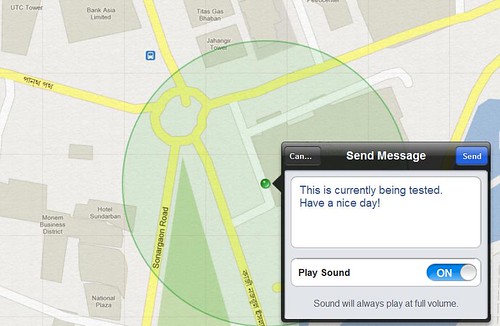
Option to send a message with sound
Message on the device
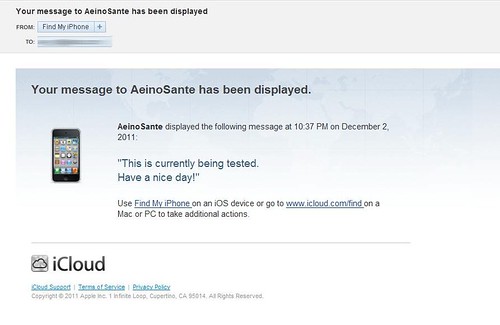
Action notification also sent to your iTunes account email
PROS:
• Ability to send message and play a sound instantaneously
• Option to wipe out device data remotely
• Email alert can be set up to inform you once the device goes online if you are not able to track it before because it is offline.

CONS:
• Location accuracy is dependent on the number of cellsites in proximity
• Sound can be stopped even without unlocking the device


Saturday, April 2, 2011

Product Review: Pacsafe MeshSafe B200

SPECIFICATIONS
(As stated on the pacsafe website)
  • Materials: 840D nylon, 1680D polyester, high-tensile stainless steel wire
  • Dimensions: 36 x 48 x 19.5 cm / 14.4 x 19.2 x 7.7 in
  • Laptop sleeve dimensions: 29 x 34.5 x 5 cm / 11.5 x 13.6 x 2 in
  • Volume: 25 L / 1526 in3
  • Weight: 1.3 kg / 2 lbs 14 oz
  • Model # 20200 Black / Silver Liner
FEATURES
(As stated on the pacsafe website)
  • Fully padded removable laptop sleeve - fits most 15” laptops
  • Front zippered compartment with removable organiser panel
  • 1 fixed padded electronic gadget pocket
  • 1 removable padded electronic gadget pocket can be attached to shoulder strap for convenience
  • Water bottle / compact umbrella side pocket
  • Padded adjustable shoulder straps
  • Padded air mesh back support
  • Anti Theft Features:
    • eXomesh® Slashguard front and bottom panels
    • Slashproof adjustable shoulder straps
    • Snatchproof shoulder strap allows the bag to anchor to a secure fixture
    • Tamperproof zippers


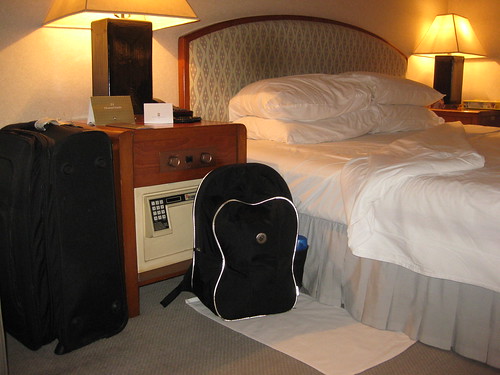
My MeshSafe B200 full of my stuff
  USER REVIEW
Date and place of purchase: December 17, 2009, The Travel Club, Alabang Festival Mall
Price: Php 6000.00

Pros:
  • Very tough and durable bag. This is the very first bag that survived me for a year. I've been using it for more than a year now but its still in good condition. The average lifespan of my previous bags is less than six months.
  • I love the removable laptop sleeve. For a guy like me that is always on the move, its been a comfort to just slip out the sleeve just in case I dont want to bring along my laptop.
  • The removable organizer panel keeps your small gadgets and flash drives handy.
  • The anti-theft features really give me a peace of mind while travelling. The cable reinforced shoulder strap can be attached to an airport bench or a bus stations' chair while waiting to board. This prevents someone to just pick up your bag and walk or run away.


My personal portable safe MeshSafe B200
 Cons:
  • Quite expensive price tag
  • I did not find the removable padded electronic gadget pocket that can be attached to shoulder strap mentioned on the product features.


Friday, December 17, 2010

Product Review: Wow Fiesta WF210

FEATURES AND FUNCTIONS
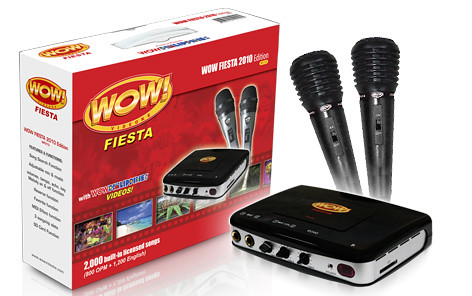
  • 2 wired mics (mic1 and mic2 has separate volume control)
  • WOW Philippines videos and pictures
  • Lightweight & Portable -- unit weighs only 250g
  • Song Search Function (Search by OPM or English / Search by first letter of the song title)
  • Adjustable mic & music volumes, tempo, echo, key, melody
  • Reserve function - reserve up to 99 songs
  • Favorite function - save up to 99 favorite songs
  • MIDI effect function - Disco, Jazz, Stadium, Classic, Normal
  • 3 songchip slots
  • SD Card Function - Play videos and mp3. Upload pictures too.
Wow Fiesta WF210

BASIC PACKAGE
  • Main unit
  • Remote control
  • Carry bag
  • Song book
  • Two wired mics
  • Power adaptor
  • AV Cable
USER REVIEW

Date and Place of Purchase: September 5, 2010, Automatic Center, Alabang Festival Mall
Price: Php 5,999.00

Pros:
  •  Very portable. Synthetic leather carrying bag that comes with the package provides ease of carrying the unit. The bag provides organized space for the main unit, two wired mics, user manual and song book, power adaptor, av cable and remote control.
  • Picture quality is fine. Background video featuring tourist spots, events and wildlife of the Philippines is very appealing to the eyes.
Screen Capture of WF210 on LG LCD tv
  • Built in 2000 songs (1200 English and 800 OPM) are more than enough to satisfy Saturday and Sunday family videoke sessions. Three more slots are available for expansion music chips (if 2000 songs is still not enough for you).
  • Melody volume is adjustable and four MIDI effect is available to choose from.
  • Songs are licensed. So it means you are helping the music industry specially the OPM industry. 
Cons:
  • The 2 wired mics that they throw away free with the unit is really a throw away. Sound quality of the microphone is not good. I guess it is not a unidirectional microphone as it can only be used by singing/speaking directly on top of it. The wire design that is detachable from the base of the mic is another flaw as it sends clicks when it is moved while you are using it. I solved this by purchasing a Sony microphone that costs around Php500.
  • There is no volume levelling. Some MIDI videoke song is loud and some is faint, so you have to constantly adjust the volume depending on the song.
  • The power adaptor perished after three months, with the fact that we only use it on weekends for about 1-2 hour per day. I dont have the time to tinker with it so I solved it by purchasing a universal power adaptor for around Php769. I just see to it that the ampere rating of the power supply is the same as what is needed by the unit which is 12V 1A DC. This power adaptor failure could just be an isolated case and may not hold true to all their units. When I have the time I'll check out the power adaptor and update this page.

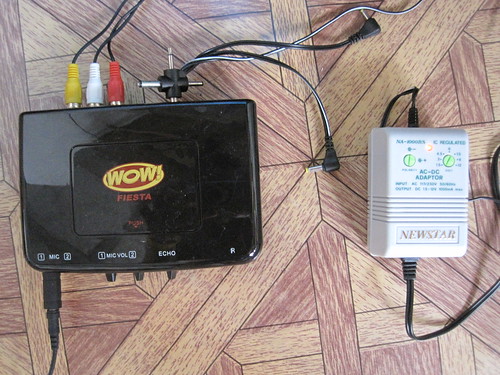
My Wow Fiesta with a non-stock power adaptor 12V 1000mA DC
  • Absolutely no after sales support. When the power adaptor failed I tried to claim for warranty. When I checked the manual, it says that I have to register my product on http://www.wowvideoke.com/warranty. When I surfed the page they are mentioning, the wesite says that the page is Wow! Not Found! :) I tried variants of the address like ../warranty.php .../warranty/ and .../warranty.html but still no luck. I tried to email them on the address mentioned on the user manual customerservice@wowvideoke.com and up to now I never heard from them. There's a hotline number listed on the manual also but I did not bother to call since I figured out its much less hassle to just replace the power adaptor myself.

Screen Capture of http://www.wowvideoke.com/warranty
DEFECTIVE POWER SUPPLY (Update: October 2011) 
     I finally found the time to try to repair the failed power adaptor that came with the unit. The power adaptor is not easy to open as it has no screws that holds it together. It is basically clipped on together but with a little adhesive applied. So after quite sometime I managed to open it. Then I found that the problem is just a disconnected wire that goes from the circuit board to one of the prongs of the power adaptor's male plug. I soldered the wire to the prong and when I plugged it in, voila! It now works again.

SONGBOOK (Update: November 2011)
     I have also experienced having a songbook with missing pages. Torn by constant use and hurriedly flipping trough the pages. So I have searche the internet for the Wow Fiesta WF210 Songbook. Luckily I have found the songlist provided by wowvideoke support. The songlist file was provided as a microsoft excel file. But then when I look at the file it was arranged by songnumber instead of the usual alphabetically arranged songlist. So I decided to edit the songlist and arrange it by the song title. I have also deleted the column for composers because we dont normally look at them when searching for a specific song to sing. I arranged the songlist in a layout that is comfortable to look at. You can download the WF210 English and OPM songlist on my google docs account. I have provided the links below. In case you want the excel version of the songlist as provided by wowvideoke support, you can download it here.